DeepBotDownload

Your computer · Your model · Your rules

Your own AI team.
Right on your computer.

DeepBot does more than answer. It opens a browser, runs commands, writes files, remembers what it learned and tells you when it is done. All on your computer.

  • 1 program, no server to run
  • Any model, or one on your own machine
  • ∞ coworkers you can make

A real computer

A chatbot talks.
DeepBot works.

You say what you want done. A Bot opens the pages, clicks, types, runs the commands and saves the files, and you can watch every step live or come back when it says it is done.

Personal AssistantWorking · 0:00
Book me a haircut with Ana at Studio Lumen, Friday after 5.
Tell Personal Assistant what to do next…
Personal Assistant's computer
ScreenFiles
1
Personal Assistant is driving. Take over whenever you want.Take control
WorkspaceNameRecent
  • The web work, done

    Its own Chrome. It reads the pages, fills in the forms and posts for you, even on sites that have no API.

  • The technical part, handled

    A terminal on your computer. It installs what it needs, runs the scripts and checks that they worked.

  • Files you can use

    What it makes lands in the chat, ready to open or download. Its working files stay for next time.

What people hand over

Say it once. Get it done.

Real jobs and what comes back: the bookings, the messages, the server, the file to print. Most of it happens in a browser, the way you would do it, only you do not have to.

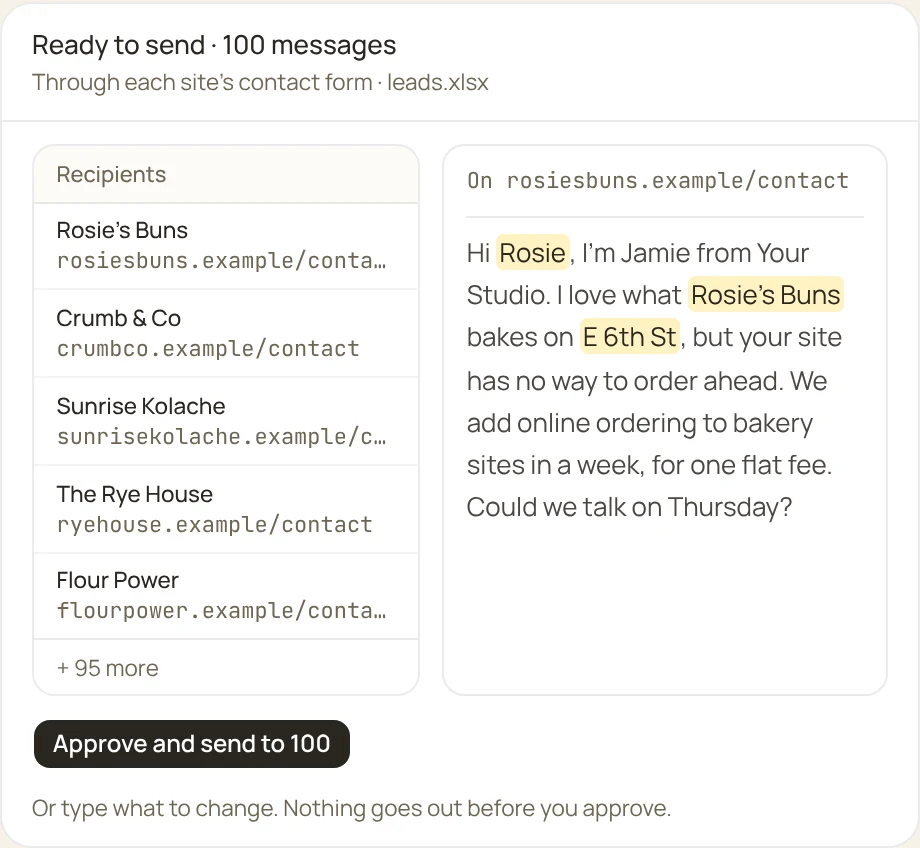
Your next 100 customers, found and written to.

Personal AssistantWorking · 0:00
Find 100 bakeries in Austin that can't take orders on their site, and offer each one ours through their contact form. Show me the message first.
Searched maps and directories312 bakeries
Opened each site100 without online ordering
Saved a fileleads.xlsx
Ready to send: 100 messages, through each site's contact form

Approved: send it to all 100.

Sent 97 of 100 through their own contact forms. Three asked for a captcha, so they are marked in leads.xlsx for you.

Tell Personal Assistant what to do next…
Personal Assistant's computer
ScreenFiles
1
Personal Assistant is driving. Take over whenever you want.Take control
WorkspaceNameRecent

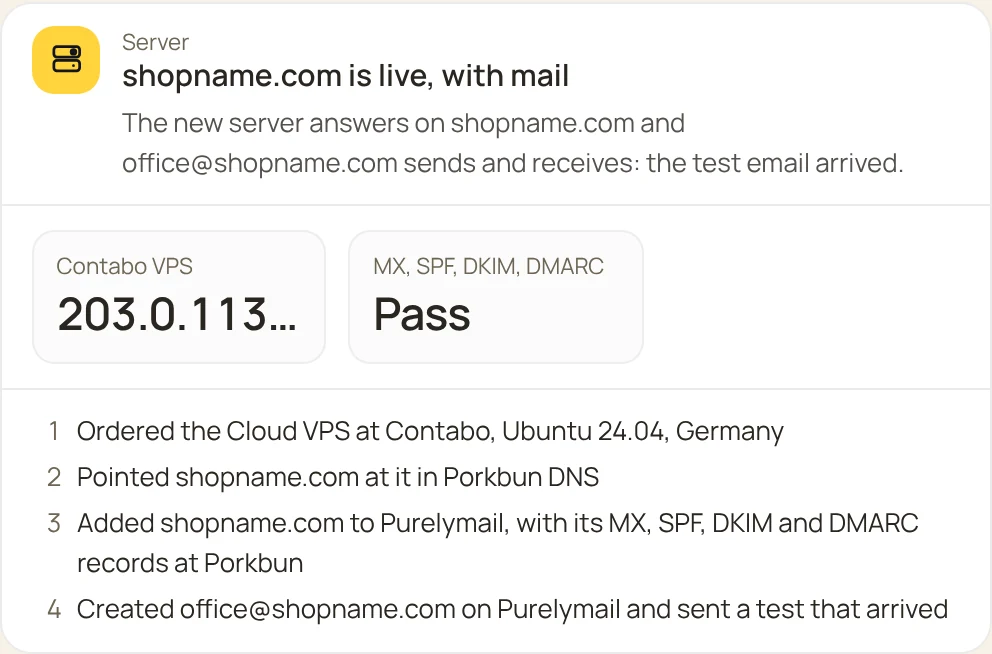
A new shop online, from the server to the inbox.

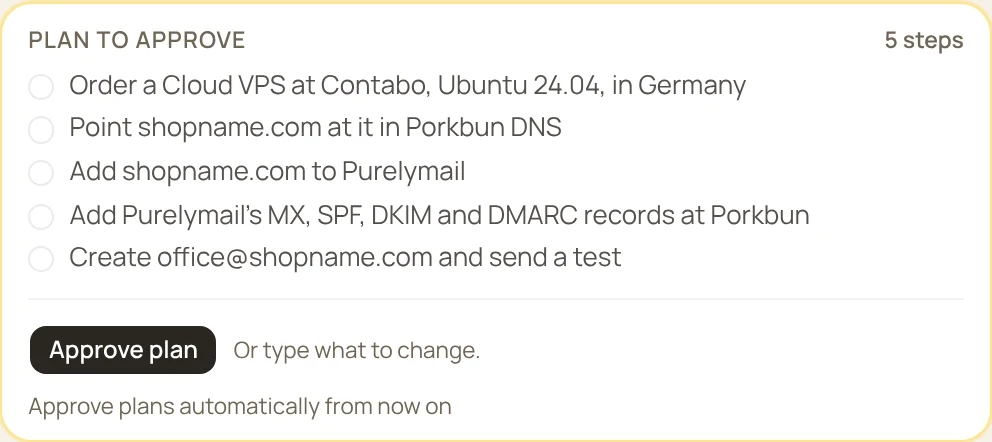
Get a server on my Contabo account for the new shop, point shopname.com at it on Porkbun, and set up office@shopname.com on Purelymail.
The plan, waiting for Approve

Plan approved

Ordered a Cloud VPSmy.contabo.com
Added A, MX, SPF, DKIM, DMARCporkbun.com
Created office@shopname.compurelymail.com
Sent a testoffice@shopname.com
Done: the Contabo server, the Porkbun domain and the Purelymail mailbox, checked

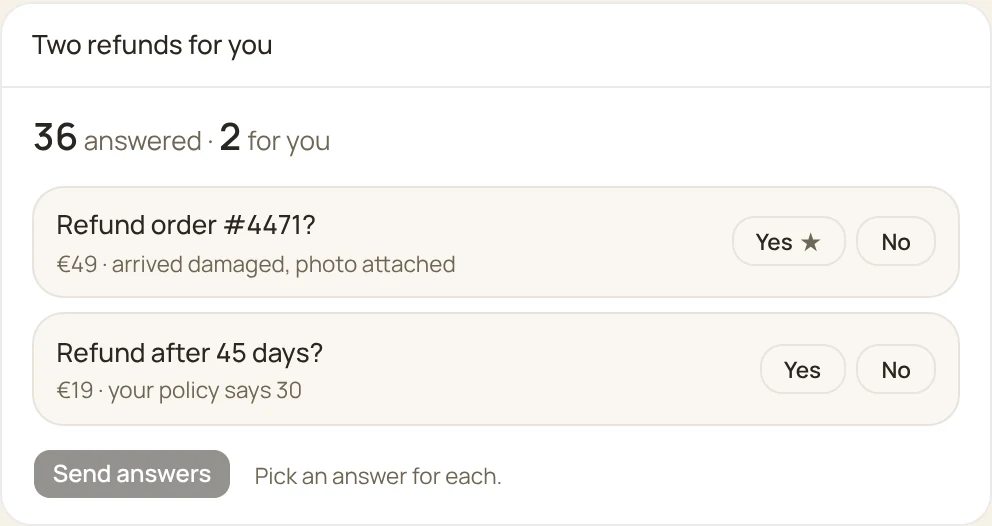
Support answered. You only see the hard ones.

Answer the new support tickets. Ask me only about refunds.
Read the inbox38 new tickets
Answered36, from your docs and past replies
Two refunds for you to decide, with Yes and No

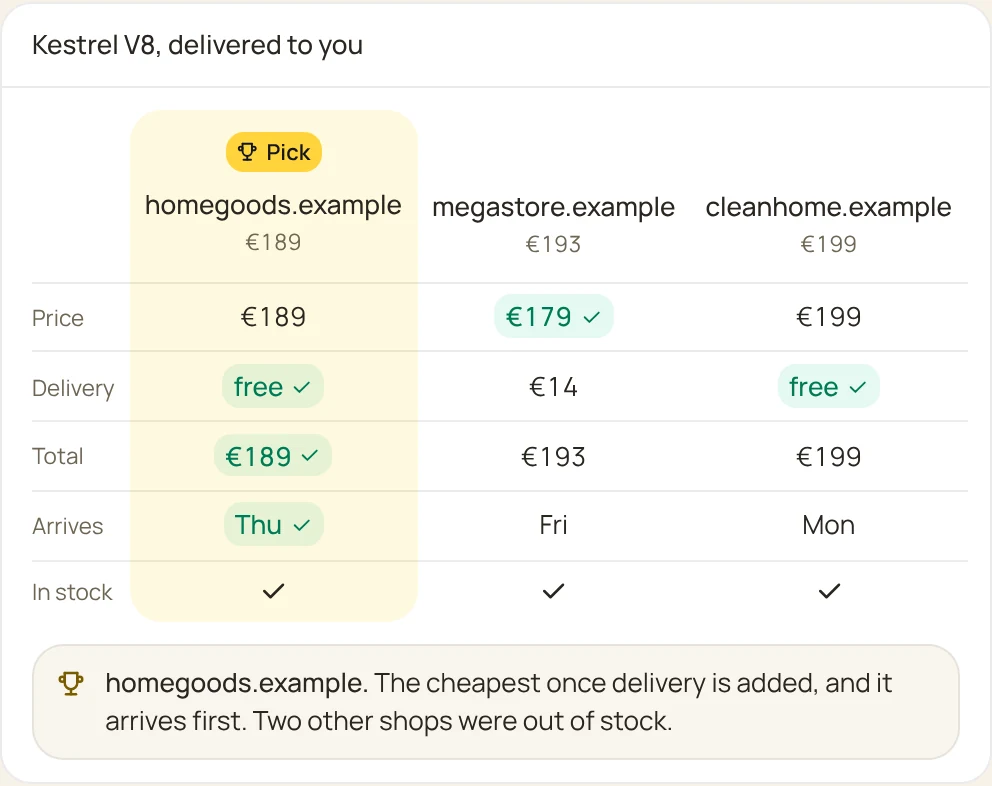
The best price, without fifteen tabs.

Find the cheapest place to buy the Kestrel V8 vacuum, delivered to me.
Searched 11 shopskestrel v8
Added delivery to your addresseach shop
Three shops compared, the cheapest delivered picked

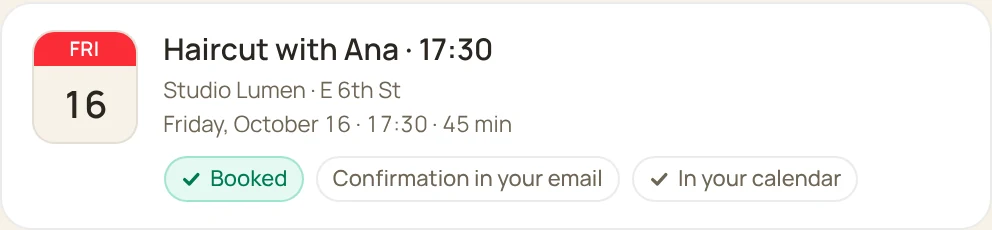
Friday's haircut, booked during your meeting.

Book me a haircut with Ana at Studio Lumen, Friday after 5.
Opened a pagestudio-lumen.example/book
ClickedFri 24, 17:30
TypedMia Novak
Booked: haircut with Ana, Friday 17:30

Posted, while you were out.

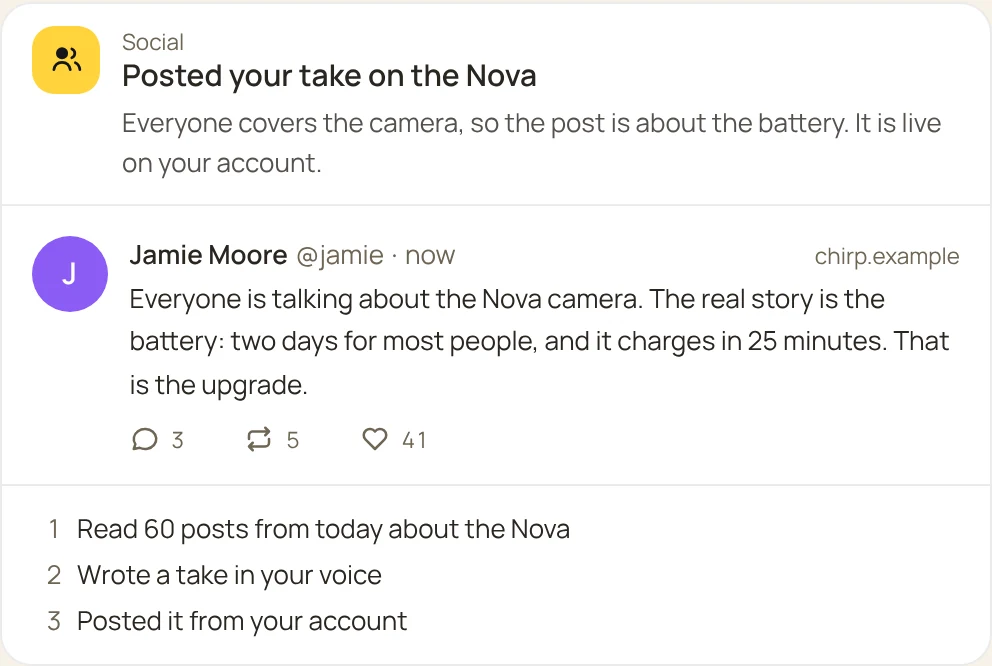
Read what people say about the new Nova phone today and post a short take.
Read the pagechirp.example/search?q=nova
TypedEveryone is talking about…
The post, live on your account

Finally see how it works.

What does the solar system look like?
Drag to turn it

A broken part, replaced by tonight.

The end piece of my vacuum broke. Make me a new one: it slides onto a pipe 32 mm across, and I want it narrow at the end for corners.
Wrote the modelvacuum-crevice-32.py

vacuum-crevice-32.stl32.4 mm socket · narrows to a 26 × 9 mm slot · 150 mm · prints standing, no supportsDownload

Never late for a birthday again.

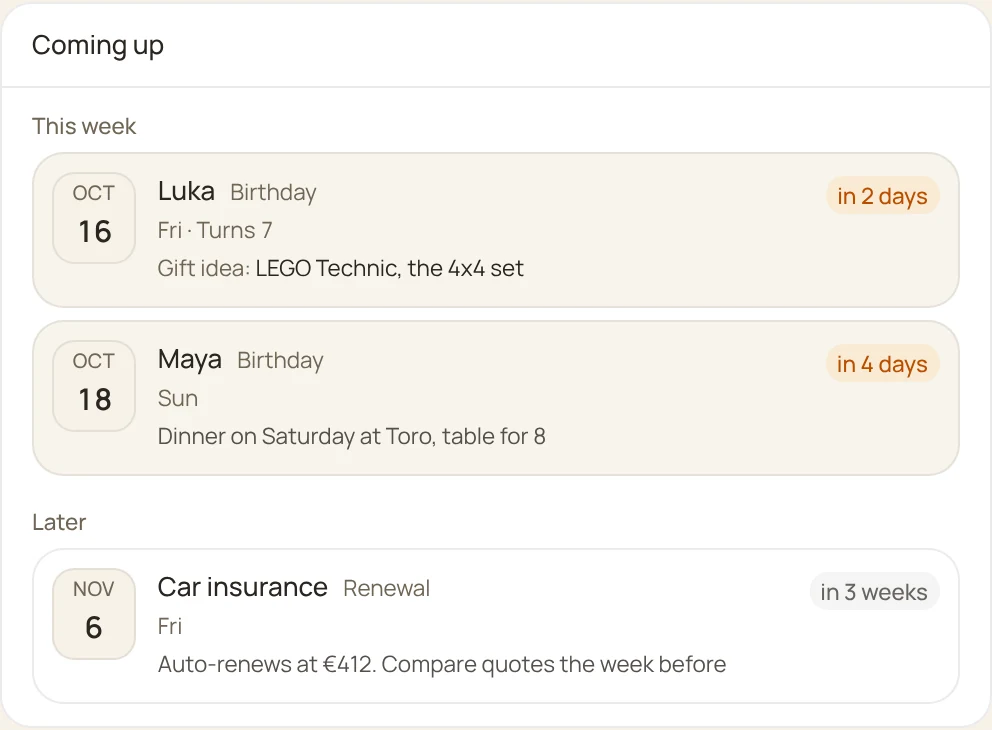
Luka turns 7 on Thursday. Remind me two days before, every year, and find a gift he will like.
Saved a reminderevery year, two days before
Found a giftLEGO Technic, the 4x4 set
Coming up: the birthdays and dates you asked to be reminded of

A site for the bakery, live by lunch.

Make a one-page site for my bakery, with the menu and the opening hours, and put it online.
Wrote the pagerosies-buns/index.html
Checked itphone and desktop
Publishedhost.example

It is live at rosiesbuns.example, with today's menu, the hours and a map. It works on a phone too.

rosiesbuns.example

Your own tool, made to measure in minutes.

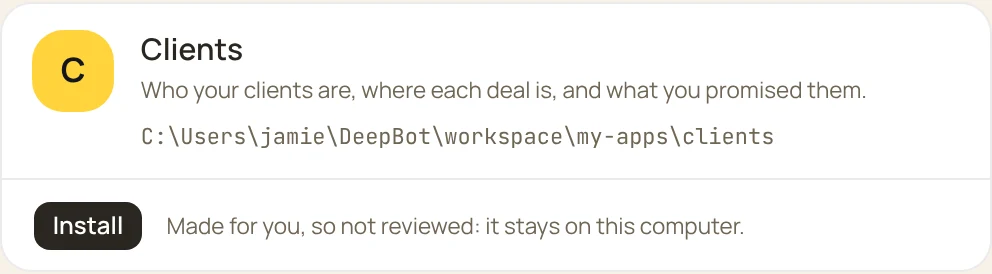
Make me a DeepBot app to keep track of my clients: who they are, where each deal is, and what I promised them.
Planned the screensa board, a client page, reminders
Wrote the appclients/
Tried every button12 of 12 work
The app, ready to install with one button

Installed

Clients12 open · €18,400 in play

Lead

Rosie's BunsWebsite · €1,200
The Rye HouseWebsite · €900

Proposal sent

Crumb & CoShop + menu · €2,400Follow up Thu

Won

Sunrise KolachesWebsite · €1,500

Now you can just say Rosie's Buns said yes, move them to Won and the Bot uses the app.

Also handed over every day:A deck from a long PDFFive short clips from a podcastUnsubscribing from 60 newslettersThe registration form, filled inA small game for the kidsResearch with a source for every numberThe Monday report, every Monday

And apps, when you need a whole tool.

An app gives your Bots a full workspace for one kind of job, with its own screens and its own know-how. The catalogue is where they will live, and anyone can build one.

See the apps

Your own programs

Hand over the clicking.
In your own apps.

Switch on Let Bots use this computer and a Bot can work in the programs you already use, with your mouse, your keyboard and your logins. The spreadsheet you fill in every Monday, the report in an old program, the setting three menus deep.

  • Off until you say so

    The rest of the time Bots stay in their own browser and terminal, and your screen is yours.

  • You always know

    A yellow frame goes round your screen while a Bot is working on it.

  • One key to stop it

    Press Ctrl+Alt+Esc and every Bot lets go at once.

Team

Not one bot for everything.
A team that hands work over.

Make a specialist for every job. Each has its own computer, its own memory and its own style. When one needs help, the task goes to another.

Personal Assistant

@assistant

Your inbox, calendar, errands and research. Makes the rest of the team when you need it.

Social Media Manager

@social

Plans posts, writes and designs them, answers comments and tells you what worked.

Developer

@developer

Writes code, makes branches and opens pull requests.

Sysadmin

@sysadmin

Servers, access, backups, and everything that has to keep running.

Example: one launch, three Bots

Personal Assistant

The launch is on Friday. Passing the posts to @social.

Social Media Manager

Three posts and a short clip are scheduled for Friday at 09:00. The link on the page is broken, @developer.

Developer

Fixed and live on /launch. The link works.

You only got the message at the end.

Memory

Learns once.
Remembers for good.

A conversation is short. So every Bot has its own memory palace, and work that repeats becomes a skill or a routine.

Memory palace

Memories in rooms

People, projects, decisions and how-tos each have their wing. Mention something from a month ago, and it knows what you mean.

peopleprojectsdecisionshow-tosdiary
Routines

Works on a schedule

Say when, and it does it on its own: a morning check of the site, a weekly report, a look at the inbox. It runs on your computer, so it works while the computer is on and DeepBot is open. Away from your desk? Talk to it from your phone through Telegram.

0 9 * * 1-5every weekday at 09:00, while this computer is on
Skills and recipes

What works becomes a tool

A job that worked once becomes a skill or a recipe. Next time it goes straight there instead of finding the way again.

→ 1 call

Privacy

It runs on your computer.
Your work stays yours.

  • Local first

    The app, its database and its files live on your computer.

  • Your model, your call

    A provider you pick with your own key, or a model that runs on this computer, so your conversations never go to anyone.

  • Your rules, in plain words

    “Never submit a form.” “Ask before anything that looks like a purchase.” It keeps to them.

  • Everything is visible

    Every command and every screen, live in front of you.

Getting started

A coworker in five minutes.

  1. 1

    Install

    Download DeepBot and start it. It is one program, with no server to set up.

  2. 2

    Say what you need

    Write it in plain words. If you need a specialist, the Assistant makes one.

  3. 3

    Watch or walk away

    Follow it on screen or leave it to work. It tells you when it is done.

Developers

Build an app.

An app is a folder on GitHub: an app.json, a skill for the Bot, and pages in plain HTML and JavaScript. Tag a version, submit it, and once it is reviewed it shows up in every DeepBot.

Your AI can build one for you. Point it at deepbot.studio/llms.txt, or give it the skill from the docs.

Developer docs

Meet your first coworker.

On your computer, and ready to start.

Version 0.0.6 · Windows 10 and 11, 64-bit